Connect the forms, inboxes and business tools you already use. Start with one repeatable workflow, check its boundaries and agree who takes over when something needs a person.
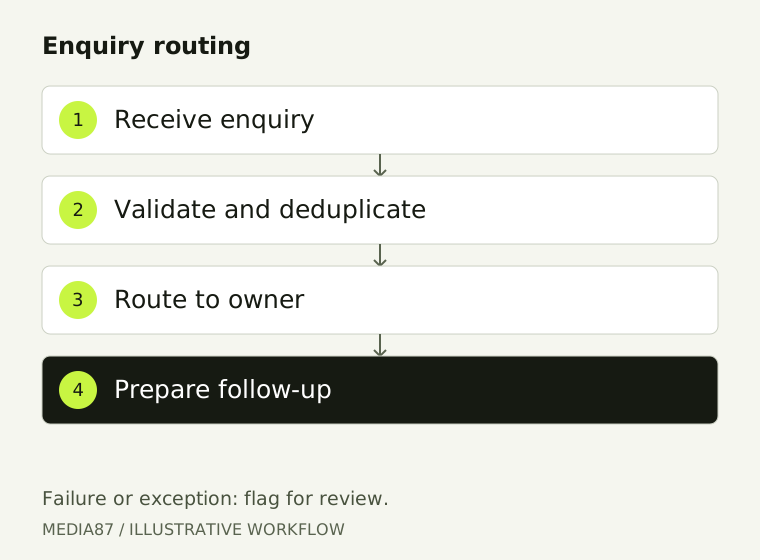
Example enquiry-routing workflow. Connections are scoped and tested against your actual systems.
Where automation helps
Start with repetitive work you can describe.
If nobody can explain how the task should work manually, automating it is usually premature.
Enquiry routing
Collect the necessary details, check for duplicates and route a new enquiry to the right person or queue.
Email assistance
Classify routine messages and prepare a draft from approved information. Keep sensitive or uncertain replies for human review.
CRM and spreadsheets
Reduce repeated copying between supported systems. Specify required fields, ownership and how failed updates will be corrected.
Follow-up and reporting
Prepare reminders and summaries using agreed triggers. Confirm consent and messaging rules before customer-facing automation.
Worked example
A form submission becomes an assigned enquiry.
This is a proposed design example, not a claim about a client implementation.
Receive: the form collects the minimum useful enquiry details.
Check: validate required fields and identify a duplicate before creating another record.
Route: use agreed service or location rules to assign the enquiry.
Prepare: create a follow-up task or reply draft for the assigned person.
Escalate: send failures or uncertain cases to the responsible team rather than silently dropping them.
The exception path matters as much as the successful path. Your integrations and permissions must be confirmed.
Implementation and handover
Agree the workflow, its owner and its limits.
The proposal should distinguish implementation work from subscriptions and ongoing maintenance.
Scope
Trigger, inputs, decisions, destination, approval point and the cases excluded from automation.
Access and data
Which accounts connect, who owns credentials and which information may be passed between systems. Do not send passwords in an enquiry.
Testing
Representative examples, duplicate submissions, missing fields, expired access and a destination that is unavailable.
Handover
The agreed workflow map, responsibilities, operating notes, review process and manual fallback.
Costs
Implementation, hosting or platform subscriptions, usage, custom connectors and ongoing support are separate scope decisions.
When a simpler solution is betterIf a standard form, CRM rule or email template solves the problem, a custom AI workflow may add unnecessary cost and maintenance. Start with the simplest reliable route.
Explore the work
See how the components fit.
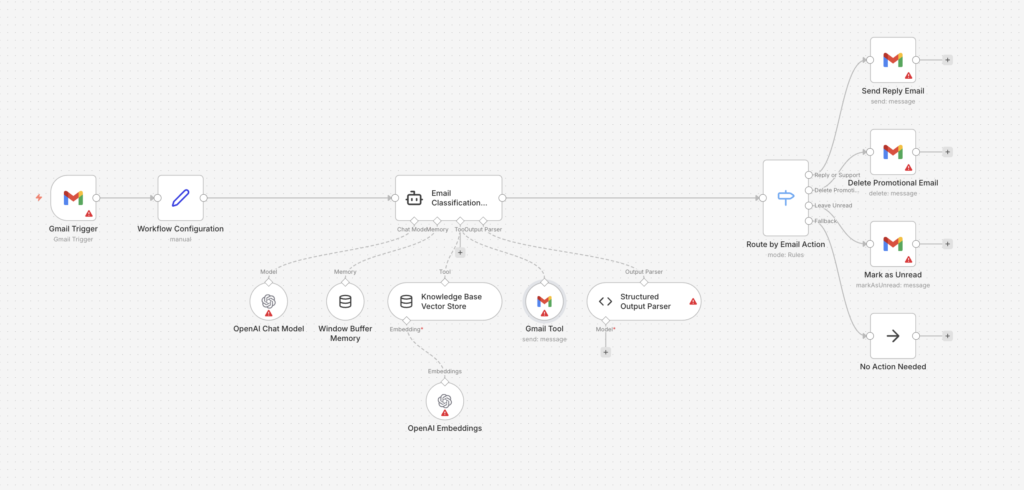
Workflow screenshot from Media87’s email automation guide, not a client result. Review current node settings, credentials and approval rules before implementing it.