

Managing emails can quickly become overwhelming — especially when your inbox is full of repetitive questions, promotional emails, and messages that don’t need your immediate attention.

In this guide, you’ll learn how to build an AI-powered email assistant using n8n and OpenAI that can:

This workflow is designed to save time without losing control.

Before we dive into the setup, here’s what the automation does at a high level:

This is not a “reply to everything” bot — it’s a controlled, intelligent assistant.

To follow this guide, you’ll need:

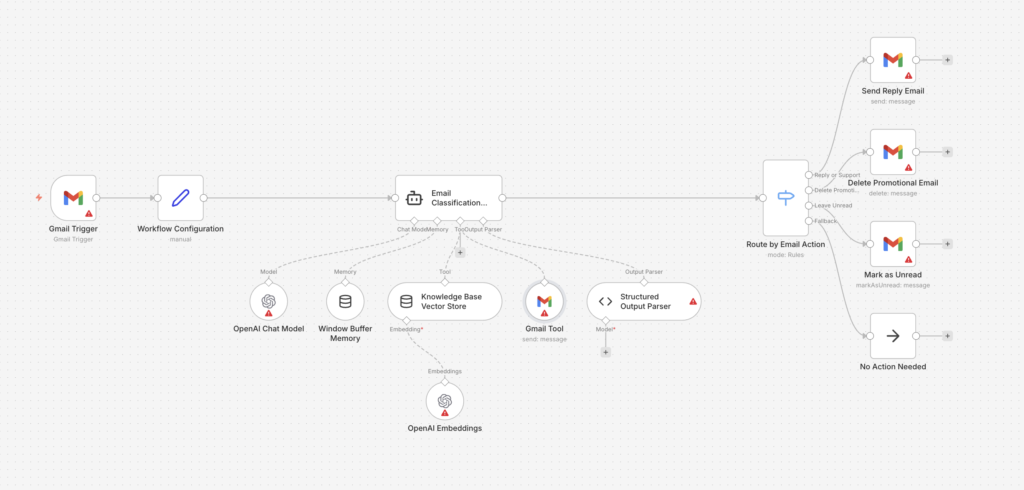
Here’s how the automation works step by step:

Each step is explained in detail below.

Start by adding a Gmail Trigger node.

This node listens for new emails arriving in your inbox.

Add a Set node after the Gmail Trigger.

Create the following fields:

This step ensures all downstream nodes receive clean, consistent data.

This is the core intelligence of the workflow.

Add an AI Agent (LangChain Agent) node and configure it with a system prompt similar to:

You are an intelligent email classification assistant.Classify each email into one of the following:

This step is what makes the automation smart, not risky.

Add an OpenAI Chat Model node and connect it to the agent.

Recommended settings:

This model powers the reasoning and response generation.

Attach a Window Buffer Memory node to the agent.

Why this matters:

This is especially useful for ongoing conversations.

Add a Vector Store with OpenAI Embeddings.

Use this to store:

The AI can now search your knowledge base before replying, making responses more accurate and consistent.

Add a Structured Output Parser node.

Force the AI to return data in this format:

This step is critical for safety and reliability.

Add a Switch node based on the action field.

Create three routes:

Optional: Add a No-Op node as a fallback.

Before activating:

Once verified, activate the workflow.

This automation is designed with guardrails, not blind automation:

This makes it suitable for:

Treat this article as a starting point, then connect the advice to your business model, customer journey, and current marketing stack. A useful implementation plan should identify the outcome, the first action, the owner, the metric, and the point where the work needs expert review. For broader support, compare the recommendation with Media87 digital marketing services at Media87.

Start with the highest-friction step in the current workflow, then improve one measurable outcome before adding complexity.

Ask for help when the work affects revenue, customer experience, tracking accuracy, or public brand trust.

Review performance monthly and update the process when customer behaviour, platform rules, or business priorities change.

Before connecting an AI email workflow to a live inbox, define exactly which messages the system may classify, which messages it may draft only, and which messages it must never answer without human review. Good candidates for automation include receipt acknowledgements, lead routing, meeting-request triage, simple support categorisation, and internal follow-up reminders. Poor candidates include legal complaints, billing disputes, sensitive HR messages, angry customers, refund decisions, and anything that could create a contractual commitment.
A reliable n8n setup should also keep a clear audit trail. Save the original message ID, sender, classification label, confidence score, suggested response, final action, and the workflow version that made the decision. This protects the business when a customer asks why a message was handled a certain way and gives the marketing or operations team enough evidence to improve prompts without guessing.

The first metric is response speed, but speed alone is not enough. A fast inaccurate reply damages trust. Track the percentage of messages classified correctly, the percentage of AI drafts edited by a human, the number of messages escalated, and the number of leads or support requests that received a useful next step. If the edit rate stays high after two or three review cycles, the prompt, category map, or knowledge source needs refinement before more automation is added.

For agencies and service businesses, the most useful commercial metric is often lead handling quality. Tag enquiries by service type, urgency, budget signal, and next action. Then connect high-intent enquiries to the right internal page, sales pipeline, or consultation workflow. This turns email automation from a generic productivity experiment into a measurable conversion support system.

Bottom line: AI email automation works best when it is treated as a controlled operations workflow, not a magic inbox assistant. Keep the first version narrow, protect human handoff, measure accuracy, and expand only after the system proves it can handle real customer messages safely.

CONTINUE READING