

Learn how to use n8n to collect an idea, prepare a LinkedIn draft and keep a person responsible for review before publishing.
Download the LinkedIn workflow →
A LinkedIn post assistant is more useful when it manages a controlled content workflow rather than acting as a one-click text generator. Begin with a source you trust: a form submission, meeting note, voice transcript, saved article idea, customer question, campaign brief, or approved spreadsheet row. n8n can collect that source, standardise the fields, request a draft, route it to review, and record the final publishing result.
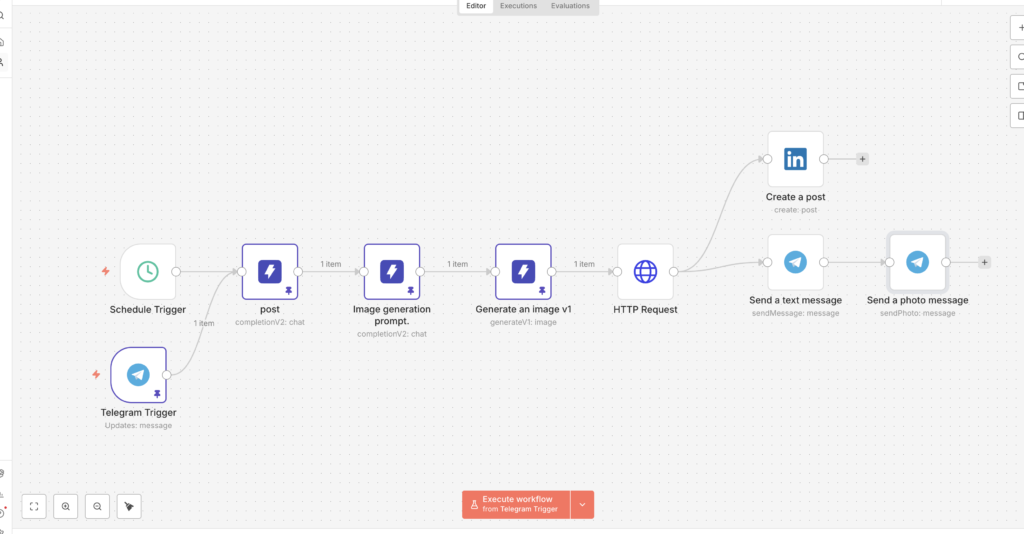
Keep each stage responsible for one decision. Idea capture decides what the post is about. Source retrieval supplies facts and examples. Drafting turns those inputs into readable copy. Quality control checks claims, tone, repetition, and formatting. Approval confirms that a person accepts the exact version. Publishing sends only that approved version. Analytics later indicates which themes deserve another iteration. Combining all decisions in one prompt makes failures harder to diagnose and increases the chance of unsupported copy.
Require a clear audience, business purpose, source notes, CTA, and content owner.
Generate structured output, then check claims, tone, links, length, and duplicate risk.
Publish only an explicitly approved version and prevent retries from creating duplicates.
Step 1: define the input schema. Create fields for topic, target audience, post objective, first-hand insight, supporting source, desired CTA, tone, deadline, and owner. If the workflow starts from a Google Sheet, use one row per post and statuses such as Idea, Drafting, Needs Review, Approved, Published, Failed, and Skipped. Structured input prevents the model from guessing what the business wants to say.
Step 2: normalise and validate. Use Set or Edit Fields nodes to create consistent names. Add an IF node that blocks empty topics, missing sources, or unsupported approval states. Clean excessive whitespace and cap source length. If personal or client-confidential data appears, remove it or route the item to a safer manual process.
Step 3: create a structured draft. Request fields such as hook, body, CTA, sourceSummary, claimsToVerify, visualIdea, and riskLevel. Tell the model to use only supplied facts, preserve uncertainty, avoid fake personal stories, and return a review flag when the material is incomplete. Include a few approved examples that demonstrate voice without forcing every post into the same template.
Step 4: add deterministic checks. Code or IF nodes can reject an empty draft, an unsuitable length, missing source references, banned promises, duplicated URLs, or malformed JSON. Store a content fingerprint based on the source row and approved copy so retried executions cannot publish twice. Check for an existing Published status before the publishing node runs.
Step 5: request human approval. Send a compact review card with the hook, body, CTA, sources, risk flags, and approve or revise actions. The callback should write the approver, time, decision, and final edited copy to the source of truth. A delivered email or chat message is not approval; require an explicit state change.
Step 6: publish with the right credentials. LinkedIn publishing depends on application access, member or organisation context, permissions, and current platform requirements. Confirm the supported route in LinkedIn’s Posts API documentation and use the relevant n8n LinkedIn credential guidance. Keep tokens in n8n’s credential store, not in a Code node, sheet, prompt, or execution log.
Step 7: record the result. Save the platform response ID, post URL when available, timestamp, workflow execution ID, model, approver, and status. If publishing fails, write a readable error to the row and route the item to a failure queue. Do not regenerate different copy after an API error; the approved copy should remain unchanged unless a person requests revision.
Separate stable instructions from post-specific inputs. Stable instructions describe the audience, voice, prohibited claims, formatting preferences, and approval policy. Post-specific inputs contain the current idea, evidence, offer, examples, and CTA. Make the distinction between sourced content and suggestions explicit. If the model proposes an example, statistic, or personal experience not present in the inputs, it should label it for review instead of presenting it as fact.
A practical prompt asks for one strong opening, a logical body, one grounded example, and a CTA that matches the objective. It also requests claimsToVerify and sourceReferences as separate fields. For a founder account, require first-person claims to come from supplied notes. For a company page, require service descriptions and offers to match approved website copy.
Add idempotency before publishing. A webhook retry, timeout, or manual rerun must not create another LinkedIn post. Build a unique key from the content row ID and approved version, check whether that key already produced a platform response, and stop when a match exists. Use a lock or atomic status update when concurrent executions are possible.
Protect against workflow drift. Keep the sheet or database as the operational source of truth, version the prompt, and log which version created each draft. Review n8n execution retention so sensitive notes are not stored longer than necessary. Configure error workflows for credential expiry, permission changes, malformed output, rate limits, and publishing failures. A failed node should create an actionable task, not disappear inside execution history.
Keep human review meaningful. Show the complete final copy, identify every external link, surface unsupported claims, and make revision easy. For regulated, financial, legal, health, employment, or sensitive client topics, require specialist review and do not enable autonomous publishing merely because earlier low-risk posts succeeded.
It can support publishing when the chosen integration or API route, account context, application access, and permissions allow it. Verify current LinkedIn and n8n documentation before building the final node.
Start draft-first. Autonomous publishing should be limited to narrow, proven, low-risk content after sourcing, formatting, permissions, duplicate prevention, and errors are consistently controlled.
Provide first-hand notes, real customer questions, approved examples, a specific reader, one clear objective, and a distinct point of view. Reject drafts that could belong to any company.
Create a unique key for each approved version, check the tracker before publishing, store the platform response immediately, and stop retries when that key already succeeded.
Save the approved copy, response ID, URL when available, time, approver, source row, prompt version, workflow execution ID, model, and status.
Review themes against relevant profile actions, qualified conversations, useful clicks, saves, comments from the target audience, and business enquiries. Use reach as context rather than the only success measure.
Need a controlled LinkedIn content system? Media87 can help map the editorial workflow, n8n automation, review controls, campaign context, and measurement through Media87 digital marketing services.